Lesson 2 – Variables and Data Types (with basic operations)
In this lesson you will:
- Create and use variables.
- Use integers, floats and strings.
- Use basic arithmetic operators with numbers.
- Explain and use integer division (//) and modulus (%) with examples.
- Convert text input into numbers using int() or float().
By the end you should be able to:
- Create and use variables.
- Use integers, floats and strings.
- Use basic arithmetic operators with numbers.
- Explain and use integer division (//) and modulus (%) with examples.
- Convert text input into numbers using int() or float().
1. Data types – what kind of data is this?
A data type tells Python what kind of data a value is.
In this lesson we use:
- integer – whole numbers, e.g. 3, -10, 42
- float – decimal numbers, e.g. 3.14, 0.5, 10.0
- string – text in quotes, e.g. "hello", "123"
Example 1 – Spot the types
print(10)        # whole number
print(3.5)       # decimal number
print("Python")  # text
Try it yourself
Change each line so it prints a different integer, a different float, and a different word.
Output
Example Solution
print(42)        # different integer
print(7.8)       # different float
print("Hello")   # different word
2. Variables – storing values
A variable is a name that stores a value. You create a variable using =.
In coding, variables are like cardboard boxes:
- They have labels so we can identify them
- They can hold information inside
- We can look inside the box by using the variable name

Variables are like labelled boxes that store values.
A variable is like a labelled box:
- The label is the variable name
- The contents are the value stored inside
- In this example:
namestores"James"scorestores10
Name = "James"
score = 10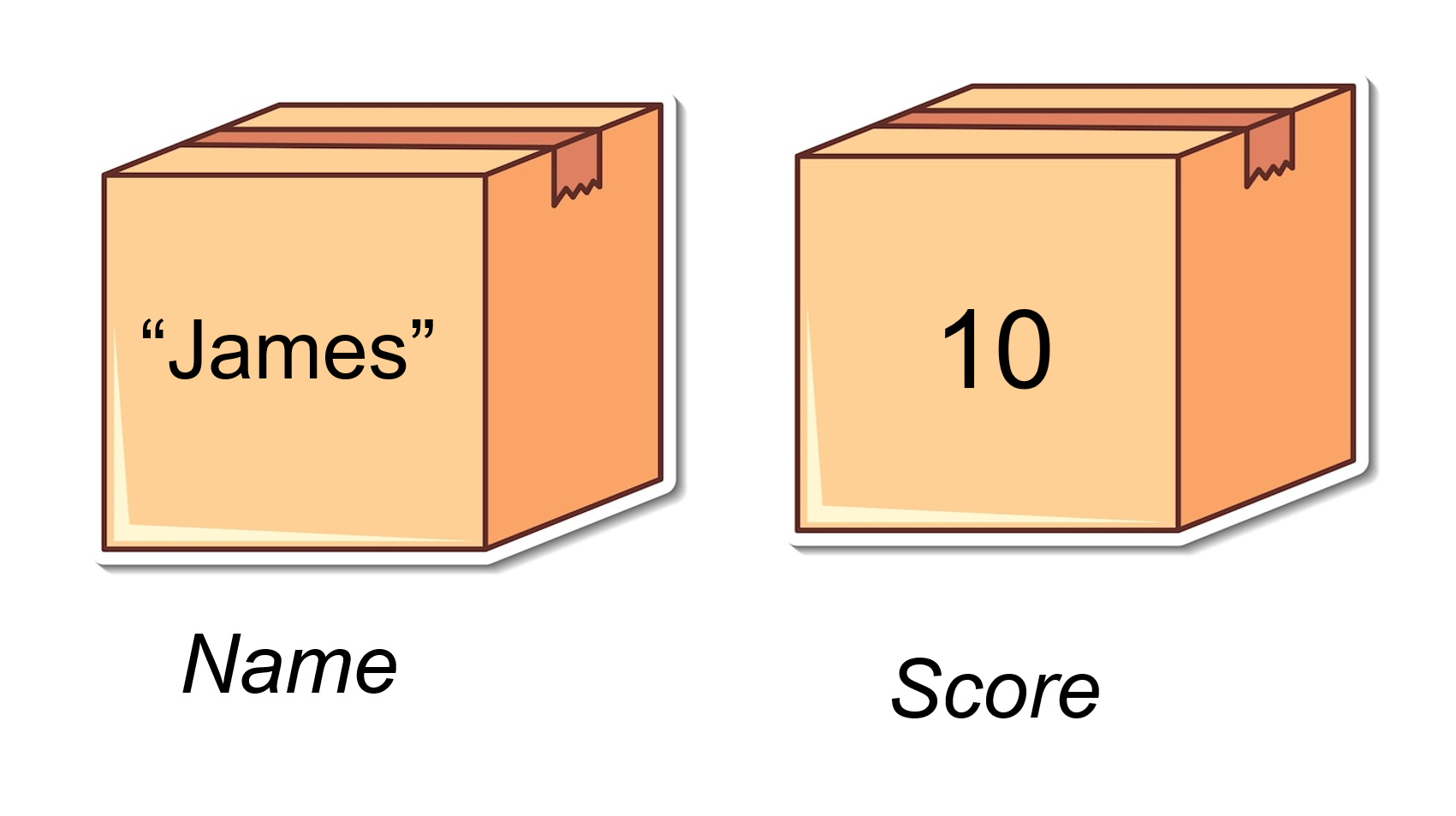
Each variable has a name (label) and a value stored inside.
Variables can change over time.
This happens when we overwrite what is stored in the box by assigning a new value.
Even though the label stays the same, the value inside the box changes.
Name = "Amelia"
score = 15
The old value is replaced by the new one.
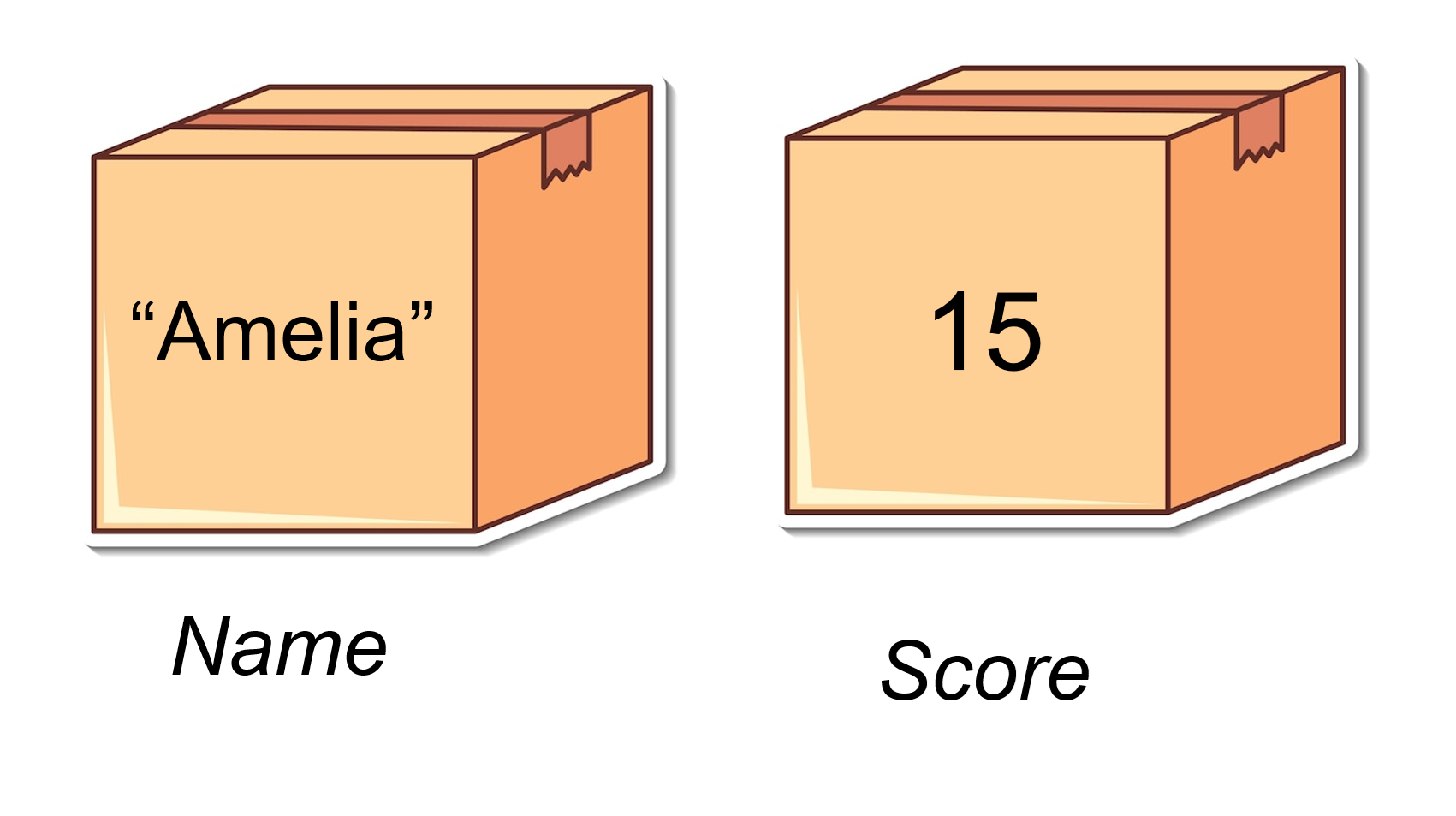
Variables can be updated by assigning new values.
age = 15          # integer
price = 2.50      # float
message = "Hi!"   # string
You can then use the variable in print():
print(age)
print(price)
print(message)
Updating variables
You can change the value later:
score = 0
print(score)

score = 10
print(score)
The name score now refers to the new value.
Basic rules for variable names
- Use letters, digits and
_(underscore). - Do not start with a digit.
- No spaces:
player_scoreis OK,player scoreis not.
Try it yourself
Modify the name, age, and favourite_number variables to use your own values. Then run the code to see your personalized output.
Output
Example Solution
# Modified variables with different values
name = "Sam"
age = 16
favourite_number = 42
print("My name is", name)
print("I am", age, "years old")
print("My favourite number is", favourite_number)
3. Arithmetic operations with numbers
We can do maths with integers and floats.
Basic operators:
+add-subtract*multiply/divide (gives a float)
Example 2 – Simple calculations
a = 8
b = 3

print(a + b)   # 11
print(a - b)   # 5
print(a * b)   # 24
print(a / b)   # 2.6666...
Order of operations
Multiplication happens before addition unless you use brackets.
print(2 + 3 * 4)    # 14 (3*4=12, then 2+12=14)
print((2 + 3) * 4)  # 20 (2+3=5, then 5*4=20)
Try it yourself
Change a and b to other numbers. Run the code and see how the answers change.
Output
Example Solution
a = 10
b = 4

print(a + b)   # 14
print(a - b)   # 6
print(a * b)   # 40
print(a / b)   # 2.5
3.5 Integer division (DIV //) and Modulus (MOD %)
These two operators work together to split numbers into whole parts and remainders.
DIV (//) – whole number division
// means "how many whole times does this number go into that number?" It gives you the whole-number part only, ignoring any remainder.
Example: 29 divided by 10 would be 2.9, but 29 // 10 is 2 (the whole number part only).
Examples:
print(10 // 3)   # 3 (3 whole times, ignoring remainder)
print(20 // 4)   # 5 (exactly 5 times)
print(7 // 2)     # 3 (3 whole times, ignoring remainder)
print(15 // 6)    # 2 (2 whole times, ignoring remainder)
print(100 // 25) # 4 (exactly 4 times)
Predict then run
Before running, predict what each line will print. Then run the code to check.
Output
Example Solution
print(17 // 4)   # 4 (4 whole times)
print(25 // 6)   # 4 (4 whole times)
print(8 // 3)    # 2 (2 whole times)
Real-life idea: sharing sweets into equal groups.
sweets = 17
friends = 4
each = sweets // friends
print("Each friend gets", each, "sweets")
This prints how many whole sweets each friend gets (4 sweets each).
MOD (%) – remainder
% gives the remainder after division. It tells you what's left over.
Examples:
print(10 % 3)   # 1  (3 * 3 = 9, remainder 1)
print(20 % 4)   # 0  (4 * 5 = 20, no remainder)
print(7 % 2)    # 1  (2 * 3 = 6, remainder 1)
print(15 % 6)   # 3  (6 * 2 = 12, remainder 3)
print(100 % 25) # 0  (exactly divisible, no remainder)
Predict then run
Before running, predict what each line will print. Then run the code to check.
Output
Example Solution
print(17 % 4)   # 1 (remainder 1)
print(25 % 6)   # 1 (remainder 1)
print(8 % 3)    # 2 (remainder 2)
Using // and % together
// and % often go together to split numbers into parts and remainders.
Example: Sharing sweets
sweets = 17
friends = 4

each = sweets // friends     # whole sweets per friend
leftover = sweets % friends  # sweets left over

print("Each friend gets", each)
print("Leftover sweets:", leftover)
Try it yourself
Try different values for sweets and friends. Predict each and leftover first.
Output
Example Solution
sweets = 23
friends = 5

each = sweets // friends     # 4 whole sweets
leftover = sweets % friends  # 3 leftover

print("Each friend gets", each)
print("Leftover sweets:", leftover)
Example: Time conversion – minutes to hours and minutes
This example shows both // and % working together:
total_minutes = 135

hours = total_minutes // 60      # whole hours using //
minutes_left = total_minutes % 60  # leftover minutes using %

print("Hours:", hours)
print("Minutes:", minutes_left)
This splits 135 minutes into 2 hours and 15 minutes.
Try it yourself
Change total_minutes to other values (e.g. 45, 75, 200) and see how the result changes.
Output
Example Solution
total_minutes = 200

hours = total_minutes // 60      # 3 hours
minutes_left = total_minutes % 60  # 20 minutes

print("Hours:", hours)
print("Minutes:", minutes_left)
4. Strings and + with text
You can join (concatenate) strings using +.
Example 1 – Joining text and variables
name = "Alex"
fav_colour = "green"

print("Nice to meet you " + name + ". I heard your favourite colour is " + fav_colour)
This prints:
Nice to meet you Alex. I heard your favourite colour is greenExample 2 – Joining number strings
Run this code. When prompted, enter two numbers (e.g., 23 and 5).
num1 = input("Enter first number: ")
num2 = input("Enter second number: ")
print("")
print(num1 + num2)
Let's see what happens
Run the code, enter two numbers, and look at the output.
Output
What the mistake was
By default, input() returns a string (text), not a number. Even though you typed numbers like 23 and 5, Python treats them as strings "23" and "5", so it joins them together to make "235" instead of adding them.
Let's fix it
To add numbers, you need to convert the input to integers using int():
What happened: By default, input() returns a string, so Python treated the numbers as text and joined them together. The result should be 28 (23 + 5), not "235".
The fix is: Use int(input(...)) to convert the input to integers so Python can add them together.
Output
Why it works now
This prints:
28int(input(...)) converts the string input to an integer. Now num1 and num2 are integers, so Python adds them together to make 28.
Example 3 – Joining words
word1 = "I"
word2 = "have"
word3 = "cats"

sentence = word1 + " " + word2 + " " + word3
print(sentence)
This prints:
I have catsTry it yourself – Complete the sentence
Fill in the three variables so the sentence makes sense.
Output
Example Solution
word1 = "Alex"   # a name
word2 = "blue"   # a colour
word3 = "coding"   # a noun

print("My name is " + word1 + ", my favourite colour is " + word2 + " and I like " + word3)
Example output:
My name is Alex, my favourite colour is blue and I like codingImportant: numbers vs strings
1 + 2→ adds numbers →3"1" + "2"→ joins text →"12"
When joining strings, numbers must be in quotes so they are treated as text.
7. Understanding Quiz
Answer all questions below, then click "Check Answers" at the end to see your score.
print(10 // 3)print(10 % 3)print("3" + "4")age_text = input("Age: ")6. Coding tasks – Variables, data types and ops
Complete all the tasks below. Do one task at a time, run your code, and check the output.
-
Task 1 — Types + print
Create 3 variables: one int, one float, one str.
Print each variable. -
Task 2 — Update a variable
Setscore = 0and print it.
Add 10 to score (update the variable) and print it again. -
Task 3 — Four operations
Ask for two whole numbers usingint(input()).
Print: sum, difference, product, and division result. -
Task 4 — Rectangle area
Ask for width and height usingint(input()).
Calculate and print the area. -
Task 5 — Pizza share (// and %)
Ask for slices and people usingint(input()).
Print how many each person gets using//.
Print how many are left using%. -
Task 6 — Minutes to hours and minutes
Ask fortotal_minutesusingint(input()).
Use// 60for hours and% 60for minutes left.
Print:That is H hour(s) and M minute(s). -
Task 7 — Build a sentence with input
Ask the user for their name usinginput().
Ask the user for their favourite number usingint(input()).
Print one sentence that includes both.
Answer all the above tasks here
Use the editor below to complete the coding tasks above.