Lesson 6 – Arrays (Lists)
In this lesson you will:
- Explain what an array is (a data structure for storing multiple values).
- Use indexes to access and update elements.
- Use
len()to find how many elements are in a list. - Write loops to process arrays (sum / max / search).
- Predict the output of simple array code.
- Build a list from user input using
append().
By the end you should be able to:
- Create a 1D array (list) and access elements using 0-based indexing.
- Update an element correctly and avoid "index out of range" errors.
- Loop through a list to calculate totals and find the maximum value.
- Use a list to store repeated inputs and then process them.
- Explain how a 2D array represents rows and columns (at GCSE level).
1. Quick recap
From the previous lessons, remember:
- Variables store values.
- We can display output using
print(). - We can read input using
input()and convert toint()orfloat(). - Indentation matters: Python uses indentation to show which lines belong together.
- Loops repeat code (for loops repeat a fixed number of times; while loops repeat while a condition is
True).
Mini-check (predict):
What will this print?
x = 3
x = x + 1
print(x)
2. What is an array?
An array stores multiple related values under one name.
At GCSE, you'll use these key terms:
- element = one item in the array
- index = the position of an element
- value = what is stored in the element
- 0-based indexing = the first element is at index 0
In Python, we usually use a list to represent an array.
Example list:
scores = [8, 10, 21, 3]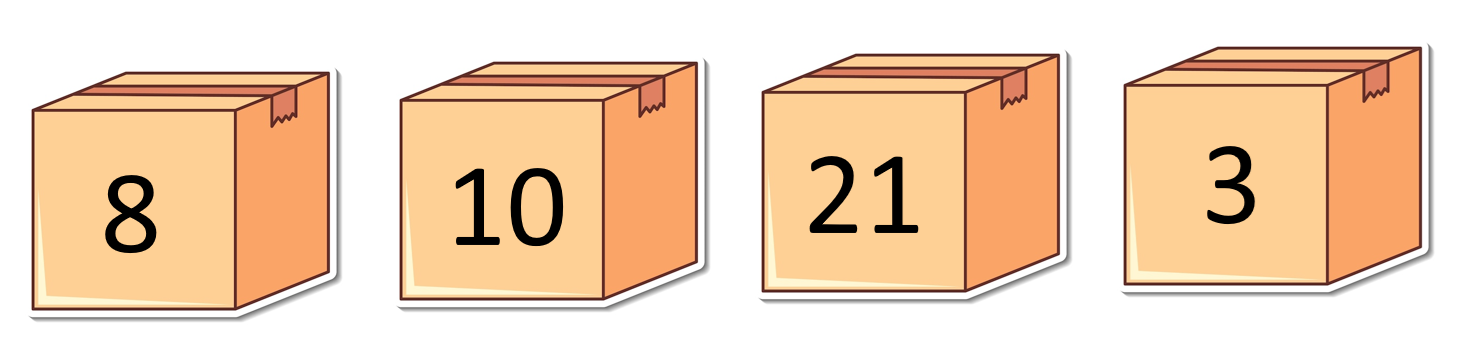
Why arrays matter:
Instead of score1, score2, score3… you store them in one structure and use loops to process them.
3. Example 1 – Accessing elements (0-based indexing)
Predict first: What will this print?
scores = [8, 10, 21, 3]
print(scores[0])
print(scores[2])
What happens:
scores[0]is the first value (8)scores[2]is the third value (21)
Try it yourself
Run it, then:
- Print the last value
- Print the second value
Output
Example Solution
scores = [8, 10, 21, 3]
print(scores[0])      # First value
print(scores[2])      # Third value
print(scores[3])      # Last value (index 3)
print(scores[1])     # Second value (index 1)
4. Understanding indexes and len()
len() tells you how many elements are in a list.
Example:
scores = [8, 10, 21, 3]
print(len(scores))
Important rule:
If there are len(scores) elements, the last index is len(scores) - 1
Example:
scores = [8, 10, 21, 3]
last_index = len(scores) - 1
print(scores[last_index])
Key points to remember:
- Indexes start at 0
len(list)is the count, not the last index- Last index is always
len − 1
Mini-check (predict):
If scores = [5, 9, 2], what is:
len(scores)?- the last index?
5. Example 2 – Updating an element
Predict first: What will the list look like after the change?
scores = [8, 10, 21, 3]
scores[1] = 99
print(scores)
What happens:
This replaces the element at index 1 (10) with 99.
Try it yourself
Change it so:
- the first element becomes 0
- the last element becomes 100
Output
Example Solution
scores = [8, 10, 21, 3]
scores[0] = 0        # First element
scores[3] = 100      # Last element (index 3)
print(scores)       # [0, 10, 21, 100]
6. Example 3 – Looping through a list and printing items
One of the simplest ways to use a loop with a list is to print each item.
Predict first: What will this print?
names = ["Alice", "Bob", "Charlie", "Diana"]

for i in range(len(names)):
    print(names[i])
What happens:
len(names)gives us 4 (the number of items)range(len(names))creates 0, 1, 2, 3- For each index
i, we printnames[i] - This prints each name on a separate line
Alternative way (simpler):
You can also loop directly through the values:
names = ["Alice", "Bob", "Charlie", "Diana"]

for name in names:
    print(name)
Both methods work! The first method (for i in range(len(names))) is useful when you need the index number.
Try it yourself
Create a list of your favorite colors and print each one using a loop.
Output
Example Solution
# Example with colors
colors = ["red", "blue", "green", "yellow"]

for i in range(len(colors)):
    print(colors[i])

# Output:
# red
# blue
# green
# yellow
7. Example 4 – Looping through a list (total / accumulator)
This is a common pattern: accumulator (running total).
Predict first: What will the total be?
scores = [8, 10, 21, 3]
total = 0

for s in scores:
    total = total + s

print(total)
What happens:
totalstarts at 0- each element is added to
total - final total is printed
Try it yourself
Change the list values and predict the new total before running.
Output
Example Solution
# Example with different values
scores = [5, 15, 25]
total = 0

for s in scores:
    total = total + s

print(total)  # 45
8. Example 5 – Finding the highest value (max)
This pattern finds the maximum value in a list by comparing each element to the "best so far".
Predict first: What will highest be at the end?
scores = [8, 10, 21, 3]
highest = scores[0]

for s in scores:
    if s > highest:
        highest = s

print(highest)
How it works step-by-step:
- Start with the first element:
highest = scores[0]setshighestto 8 (the first value). This is our starting "best so far". - Loop through each score: The loop checks each value in the list.
- Compare and update: If the current score is greater than
highest, we updatehighestto that new value. - After the loop:
highestcontains the maximum value.
Trace through the example:
- Start:
highest = 8(first element) - Check 8: 8 > 8? No →
higheststays 8 - Check 10: 10 > 8? Yes →
highest = 10 - Check 21: 21 > 10? Yes →
highest = 21 - Check 3: 3 > 21? No →
higheststays 21 - Result:
highest = 21
Why we start with scores[0]:
We need a real value from the list as our starting point. If we started with 0, and all scores were negative, we'd get the wrong answer! Using scores[0] ensures we're comparing against an actual value in the list.
Try it yourself
Try these challenges:
- Change the list to
[15, 5, 25, 20]and predict what the highest will be - What happens if all values are the same, like
[7, 7, 7, 7]? - Test with negative numbers:
[-5, -2, -10, -1]
Output
Example Solution
# Example 1: Different values
scores = [15, 5, 25, 20]
highest = scores[0]  # Start with 15

for s in scores:
    if s > highest:
        highest = s

print(highest)  # 25

# Example 2: All same values
scores = [7, 7, 7, 7]
highest = scores[0]  # Start with 7

for s in scores:
    if s > highest:  # 7 > 7? No, so highest stays 7
        highest = s

print(highest)  # 7 (correct!)

# Example 3: Negative numbers
scores = [-5, -2, -10, -1]
highest = scores[0]  # Start with -5

for s in scores:
    if s > highest:
        highest = s

print(highest)  # -1 (the least negative, which is the highest)
9. Example 6 – Building a list using append()
Predict first: How many numbers will be stored?
nums = []

for i in range(3):
    n = int(input("Enter a number: "))
    nums.append(n)

print(nums)
What happens:
- Start with an empty list
[] - Each input is added to the end of the list
Try it yourself
Change it to ask for 5 numbers instead of 3.
Output
Example Solution
nums = []

for i in range(5):  # Changed from 3 to 5
    n = int(input("Enter a number: "))
    nums.append(n)

print(nums)
10. Repeating input with a loop (then processing the list)
A very common pattern is:
- collect several inputs into a list
- then process the list (total / average / max)
Watch the video first
This video demonstrates collecting several inputs into a list and then processing the list (calculating total, average, and maximum). Watch the video below, and if you can't access it or need more explanation, read the detailed explanation that follows.
Video: Collecting inputs into a list and processing (total / average / max)
Detailed explanation
If you couldn't watch the video or need a written explanation, here's how this pattern works:
The pattern has two main steps:
- Collect inputs: Use a loop to ask the user for multiple values and store them in a list using
append(). - Process the list: After collecting all inputs, loop through the list to calculate totals, averages, or find maximum/minimum values.
Example – ask for 5 test scores, then print the average
Predict first: Which line calculates the average?
scores = []
total = 0

for i in range(5):
    s = int(input("Enter a score: "))
    scores.append(s)
    total = total + s

average = total / len(scores)
print("Average:", average)
How this code works:
- Initialize:
scores = []creates an empty list.total = 0starts our accumulator at zero. - Collect inputs (loop): The
for i in range(5)loop runs 5 times:- Each time, it asks the user for a score with
input() - Converts it to an integer with
int() - Adds it to the list with
scores.append(s) - Adds it to the running total with
total = total + s
- Each time, it asks the user for a score with
- Calculate average: After the loop,
average = total / len(scores)divides the total by the number of scores (which is 5). - Display result: Prints the average.
Why calculate total during the loop?
We could calculate the total after collecting all scores, but doing it during the loop is more efficient. We're already going through each value once, so we can add to the total at the same time!
Try it yourself
Extend it so it also prints the highest score.
Output
Example Solution
scores = []
total = 0

for i in range(5):
    s = int(input("Enter a score: "))
    scores.append(s)
    total = total + s

average = total / len(scores)
print("Average:", average)

# Find highest
highest = scores[0]
for s in scores:
    if s > highest:
        highest = s
print("Highest:", highest)
11. Indentation and loop blocks (important)
When you process arrays using loops, indentation still matters.
Example – one line inside the loop:
scores = [8, 10, 21, 3]
for s in scores:
    print(s)
Example – two lines inside the loop:
scores = [8, 10, 21, 3]
total = 0

for s in scores:
    total = total + s
    print("Running total:", total)

print("Final total:", total)
What happens:
- The indented lines repeat for each element
- The final
print()runs once at the end
Try it yourself
Move print("Running total:", total) back to the left. Predict what changes, then run it.
Output
Example Solution
When print("Running total:", total) is not indented, it's outside the loop. This means it only runs once after the loop finishes, not after each iteration.
# Correct version:
scores = [8, 10, 21, 3]
total = 0

for s in scores:
    total = total + s
    print("Running total:", total)  # Must be indented!

print("Final total:", total)
12. Common misconceptions
Read these carefully — they are very common in tests.
Mistake 1: Thinking the first element is index 1
Fix: first element is [0]
Mistake 2: Thinking the last index is len(list)
Wrong:
scores[len(scores)]Fix:
scores[len(scores) - 1]Mistake 3: Mixing up index and value
Wrong:
for x in scores:
    print(scores[x])
Fix:
for x in scores:
    print(x)
Mistake 4: Trying to assign beyond the list length
Example list:
scores = [10, 20, 30, 40, 50] # List has 5 elements (indices 0-4)Wrong:
scores[10] = 99Fix: use append() to add, or use a valid index to replace.
Mistake 5: Printing the loop index instead of the element
Wrong:
for i in range(len(scores)):
    print(i)
Fix:
for i in range(len(scores)):
    print(scores[i])
Mistake 6: Off-by-one in list loops
Use i < len(list), not i <= len(list).
Mistake 7: Confusing "append" with "replace"
Replace needs an index: scores[2] = 50
Append adds a new element: scores.append(50)
14. Understanding Quiz
Answer all questions below, then click "Check Answers" at the end to see your score.
scores = [8, 10, 21, 3]
print(scores[0])scores = [10, 20, 30]
scores[1] = 99nums = [2, 4, 6]
total = 0
for n in nums:
total = total + n
print(total)scores = [8, 10, 21, 3]
scores[0] = scores[0] + 5
print(scores[0])nums = [1, 2, 3]
nums.append(9)
print(nums)nums = []
for i in range(4):
n = int(input())
nums.append(n)Given:
scores = [5, 6, 7]nums = [4, 7, 2, 9, 7, 1]
print(nums[1])13. Coding tasks – Arrays (lists) practice
Have a go at these tasks! Work through them one at a time, run your code, and check your output matches what you expect.
Basic Tasks
Task 1 — Print specific elements (indexing)
Goal: Print the first, third and last values (each on a new line).
scores = [8, 10, 21, 3]

# your code here
Task 2 — Last element using len()
Goal: Print the last value without using the number 3.
scores = [8, 10, 21, 3]

# your code here
Task 3 — Update elements (replace)
Goal: Change the first element to 0 and the last element to 100, then print the list.
scores = [8, 10, 21, 3]

# your code here
print(scores)
Task 4 — Build a list with append()
Goal: Ask the user for 3 integers and store them in a list, then print the list.
nums = []

# your code here
print(nums)
Task 5 — Print every item (loop through values)
Goal: Print each name on a new line using for name in names.
names = ["Alice", "Bob", "Charlie", "Diana"]

# your code here
Task 6 — Print every item (loop using indexes)
Goal: Print each item using range(len(list)).
names = ["Alice", "Bob", "Charlie", "Diana"]

# your code here
Task 7 — Total (accumulator)
Goal: Calculate and print the total of all scores.
scores = [8, 10, 21, 3]
total = 0

# your code here
print(total)
Task 8 — Average (use len())
Goal: Print the average score.
scores = [8, 10, 21, 3]

# your code here
Task 9 — Maximum value ("highest" pattern)
Goal: Find and print the highest value.
scores = [15, 5, 25, 20]
highest = scores[0]

# your code here
print(highest)
Task 10 — Count how many are above a threshold
Goal: Count and print how many scores are 10 or more.
scores = [8, 10, 21, 3, 10, 9, 14]
count = 0

# your code here
print(count)
Task 11 — Linear search (FOUND / NOT FOUND)
Goal: Ask the user for a number. If it is in the list, print "FOUND", otherwise print "NOT FOUND".
nums = [4, 7, 2, 9, 7, 1]
target = int(input("Enter a number: "))

# your code here
Task 12 — Count occurrences (how many times)
Goal: Ask the user for a number and count how many times it appears.
nums = [4, 7, 2, 9, 7, 1, 7]
target = int(input("Enter a number: "))
count = 0

# your code here
print(count)
Worded Coding Problems (harder, still just coding)
Task 13 — Test scores program (collect then process)
Goal: Ask for 5 test scores, store them in a list, then print:
- the list
- the total
- the average
- the highest score
scores = []
total = 0

# your code here
Task 14 — Shopping basket total (parallel lists)
Goal: Use these lists:
items = ["pen", "pencil", "ruler", "pen"]
prices = [1.20, 0.80, 1.50, 1.20]
Ask the user for an item name, then print the total cost of all matching items.
items = ["pen", "pencil", "ruler", "pen"]
prices = [1.20, 0.80, 1.50, 1.20]

target = input("Item name: ")

# your code here
Task 15 — Lap times analysis (challenge)
Goal: Ask for 6 lap times (integers), store them in a list, then print:
- the fastest time (smallest)
- the average time
- how many laps were slower than the average
times = []

# your code here
Answer all the above tasks here
Use the editor below to complete the coding tasks above.